
Results 1 to 8 of 8

Thread: TheWeather Plugin Moded by iet5 for py2 and py3 O.E. 2.2 images

  1. #1
    korn's Avatar
    Join Date
    Dec 2010
    Location
    SatDreamGr
    Posts
    57,242
    Rep Power
    2484728

    TheWeather Plugin Moded by iet5 for py2 and py3 O.E. 2.2 images

    Update version 4.2 Some minor fixes

    Hi,

    Because this plugin is important to me, I noticed that it needed some improvements, so I made the following changes:

    Summary of the changes I made

    Several improvements have been made to the TheWeather plugin, covering the data source, the interface, and the display layout, as follows:

    Switched to Open-Meteo API as a new free, fast, and accurate data source, with Geocoding added for automatic city search and coordinate retrieval.

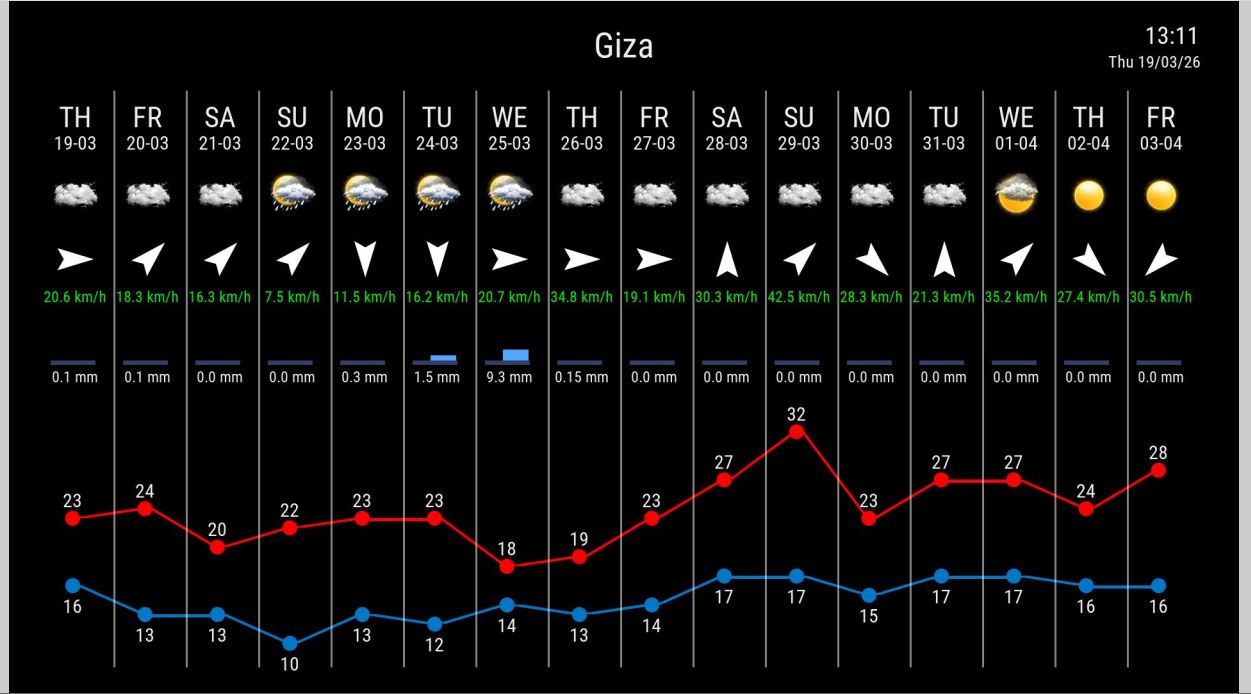
    Increased the forecast period to 16 days instead of 14 days.

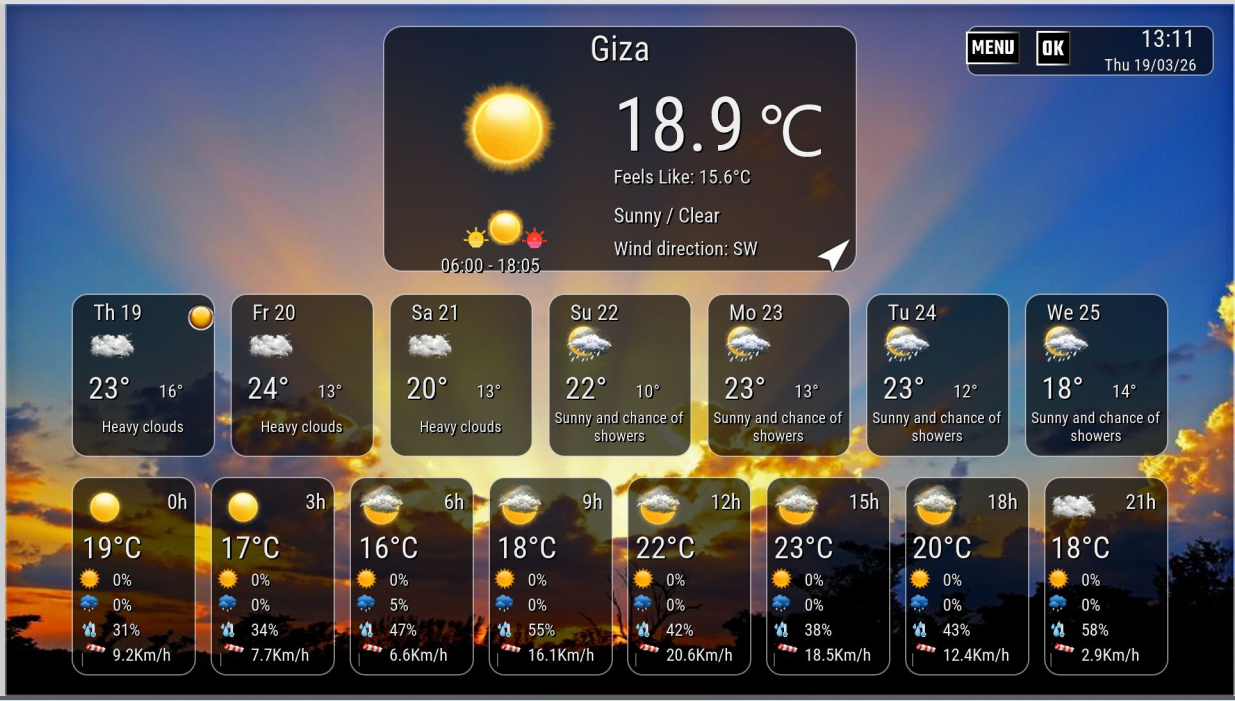
    Improved the temperature graph by lowering it to avoid overlapping with text, while keeping the maximum and minimum temperature lines properly aligned.

    Adjusted spacing and raised the rainfall section to reduce empty space and prevent overlap with the graph.

    Improved alignment inside the columns, reduced the font size for wind speed and rainfall, and changed the wind speed color to green for better visibility.

    Fixed the city name case-sensitivity issue, so the plugin can now recognize city names correctly regardless of whether they are entered in uppercase or lowercase.

    These changes start from version 4.1, to clearly distinguish them from previous releases.

    For a clean and proper installation, please do the following:
    Remove any previous version of the plugin first.

    Code:
    rm -rf /usr/lib/enigma2/python/Plugins/Extensions/TheWeather

    The plugin has been tested on Python 2.7 and Python 3.

    It has also been tested on Gemini, Merlin, and OpenATV images.

    Important note:

    This modification is not mandatory, and every user is free to use the version that best suits their needs. If someone does not like the new changes, they are completely free to return to older versions and use whichever release they prefer.





  2. #2
    korn's Avatar
    Join Date
    Dec 2010
    Location
    SatDreamGr
    Posts
    57,242
    Rep Power
    2484728

    Απ: TheWeather Plugin Moded by iet5 for py2 and py3 O.E. 2.2 images

    Update version 4.3

    HI,

    Now moving to version 4.3 For download, please go to post #1.

    During this period, a large number of improvements have been made to the plugin in terms of speed, stability, compatibility, and code organization.

    Changes:

    The plugin name and plugin folder have been changed to the new name: "TheWeatherIet5"
    Improved the startup speed of the plugin and the weather screen.
    Enhanced the way data is fetched from Open-Meteo and reduced request size, which helped improve performance.
    Improved support for both old and new city name formats.
    Added a screen for selecting between similar city names after typing the city, instead of relying only on the first result.
    Saved the selected city more accurately using the city name together with coordinates, to avoid confusion between similar cities in the future.
    Improved the city selection interface.
    Fixed the way the high and low temperature lines are drawn.
    Improved the red and blue lines.
    Made the spacing between the two lines flexible, so they do not overlap or get uncomfortably close when temperatures are similar.
    Cleaned up and reorganized important parts of the code.
    Important note:

    Before performing any installation, I recommend removing any old versions first to avoid conflicts.


  3. #3
    korn's Avatar
    Join Date
    Dec 2010
    Location
    SatDreamGr
    Posts
    57,242
    Rep Power
    2484728

    Απ: TheWeather Plugin Moded by iet5 for py2 and py3 O.E. 2.2 images

    Update version 4.3Β

    Hi,

    Now moving to version 4.3B

    This release includes a large number of important improvements and updates to the plugin, covering speed, stability, compatibility, and code organization.

    Main changes in this release:

    Added animation code to make the plugin run more smoothly and with better stability.
    Added smart code to fetch the actual sunrise and sunset times daily from the internet, and use them to determine whether to display the sun or moon icon accurately for each hour.
    Discovered and fixed an old and complex bug in the previous code that caused the bottom icon not to match the text shown beneath it. The icons are now synchronized correctly and accurately.
    Added support for dynamic switching between the Standard and Extra icon packs.
    Improved the internal code structure and organization, along with several other important enhancements.
    Improved day and night icon display

    The plugin has been updated to display the correct day and night icons based on the actual sunrise and sunset times, as requested, since the old code did not properly distinguish between daytime and nighttime periods.

    As a result, the sun icon will no longer appear in the evening, and the moon icon will now be displayed at the correct time, thanks to the new conditional rules added to the weather data retrieval code.

    Improved handling when switching between cities

    An issue related to entering more than one city within the same session has also been fixed. This issue could sometimes cause problems when exiting, especially with Python 3.

    To make the plugin 100% compatible and safe with Python 3, the following now happens when switching cities:

    First: the old screen is closed immediately and cleanly, and completely removed from memory.
    Second: a programming command is used when opening the new screen, making the plugin wait for a very short moment before opening it, until the Enigma2 system confirms that the previous screen has been fully closed, then the weather screen for the new city is opened.
    This simple but effective change prevents screens from overlapping or stacking, and completely eliminates the annoying crash issue with the OpenATV image.


    Important note:

    Before performing any installation, I recommend removing any old versions first to avoid conflicts.


  4. #4
    korn's Avatar
    Join Date
    Dec 2010
    Location
    SatDreamGr
    Posts
    57,242
    Rep Power
    2484728

    Απ: TheWeather Plugin Moded by iet5 for py2 and py3 O.E. 2.2 images

    Update version 5.0

    Hi,

    Now moving to Version 5.0 - download from first post

    We are now moving to version 5.0, which represents a major step forward for this plugin in terms of development and improvement. This release includes a large number of important changes at the interface, code, and usability levels.


    Tested on Marlin image - Gemini - Openatv 7.60 - 8.0 - VTI image

    Main Changes in This Release
    Major improvements have been made to the plugin’s internal code.
    The Settings screen has been redesigned to be cleaner and better organized.
    The Add City screen interface has been changed to make it clearer and easier to use.
    The function of the icon selection button has been modified. It is now used to switch between screen backgrounds instead of its previous function.
    It is now possible to choose easily between the available backgrounds.
    The plugin interface for the 7-day screen has been improved and now supports 16 different backgrounds, which can be switched between easily.
    The date and time of the last update have been added.
    It is now possible to choose how updates are performed, either at startup or automatically at a selected interval.
    A temperature unit option has been added, allowing you to choose between Celsius and Fahrenheit.
    A wind speed unit option has been added, allowing you to choose between kilometers and miles.
    Explanation of the Settings Screen Options
    The Settings screen contains a number of options, and the function of each one is as follows:

    Weather service

    Specifies the weather data provider used by the plugin to fetch information.
    Weather city name

    Specifies the current city whose weather information will be displayed.
    Temperature unit

    Changes the temperature unit between Celsius and Fahrenheit.
    Metric unit for wind speed

    Specifies the wind speed display unit, such as km/h or m/s.
    Weather icon set

    Changes the set of weather icons used in the plugin interface.
    Show trend arrows for moon data

    Enables or disables the display of trend arrows for moon data.
    Auto Update

    Specifies whether weather data is updated automatically or manually.
    Cache data

    Specifies how long weather data is kept in cache before a new update is requested.
    Enable Debug

    Enables or disables diagnostic and error logging to help with troubleshooting and review.
    Buttons at the Bottom of the Screen
    Select location

    Used to choose a new city for weather display.
    Save

    Saves all changes that have been made.
    Add City

    Adds a new city to the favorites list.
    Manage Favorites

    Opens the favorites management screen.
    Explanation of the Manage Favorites Screen
    The Manage Favorites screen is used to manage the cities saved in the favorites list. Its functions are as follows:

    List of saved cities

    Displays all cities saved in the favorites list.
    Select city

    Allows you to choose a city from the list to make it the active city or display its weather.
    Delete

    Deletes the selected city from the favorites list.
    Save

    Saves the selected city and sets it as the current city.
    Edit

    Allows you to modify the selected city name or data by searching for it again.
    Add City

    Adds a new city to the favorites list.
    Search / Keyboard

    Opens the search screen or keyboard to type and search for a city name.
    Return with selected city

    When this screen is opened from Settings or from the city selection screen, the selected city is returned to the previous screen.
    Sync active city

    Ensures that the selected city is synchronized with the main screen and settings.
    Restore default city

    If the list becomes empty, the default city can be restored so the plugin does not remain without a selected city.
    Explanation of the Choose City Screen
    The Choose City screen is used to select the correct city after searching. Its functions are as follows:

    Search result list

    Displays a list of cities matching the name entered in the search.
    Select city

    Allows you to choose the correct city from the search results.
    Confirm selection

    Confirms the selected city and returns it to the previous screen.
    Cancel

    Cancels the process and returns without saving any changes.
    Location matching

    Helps distinguish between cities with similar names and choose the correct one.
    Send selected city back

    Sends the selected city back to the Settings or Favorites screen so it can be saved and used.
    Sync with plugin

    After selection, the city is linked with the settings, favorites list, and the plugin’s main interface.
    Important Note
    It is recommended to remove any previous version of the plugin before installing this release, in order to avoid any conflicts or leftover files that may affect the performance of the new version.

    Code:
    # DreamOS / dpkg
    dpkg -P enigma2-plugin-extensions-theweatheriet5
    or
    rm -rf /usr/lib/enigma2/python/Plugins/Extensions/TheWeatherIet5
    
    # Open Source / opkg
    opkg remove enigma2-plugin-extensions-theweatheriet5
    or
    rm -rf /usr/lib/enigma2/python/Plugins/Extensions/TheWeatherIet5


  5. #5
    korn's Avatar
    Join Date
    Dec 2010
    Location
    SatDreamGr
    Posts
    57,242
    Rep Power
    2484728

    Απ: TheWeather Plugin Moded by iet5 for py2 and py3 O.E. 2.2 images

    Update version 5.1 Some minor fixes


  6. #6
    korn's Avatar
    Join Date
    Dec 2010
    Location
    SatDreamGr
    Posts
    57,242
    Rep Power
    2484728

    Απ: TheWeather Plugin Moded by iet5 for py2 and py3 O.E. 2.2 images

    Update version 5.5

    now moved to version 5.5

    I apologize for the issue. While working on fixing yesterday’s problem, an error occurred in one of the commands. This has now been resolved and fixed successfully.

    The plugin has been tested on:

    Merlin image
    OpenATV 7.6
    OpenATV 8.0
    All buttons and screens are now working properly.

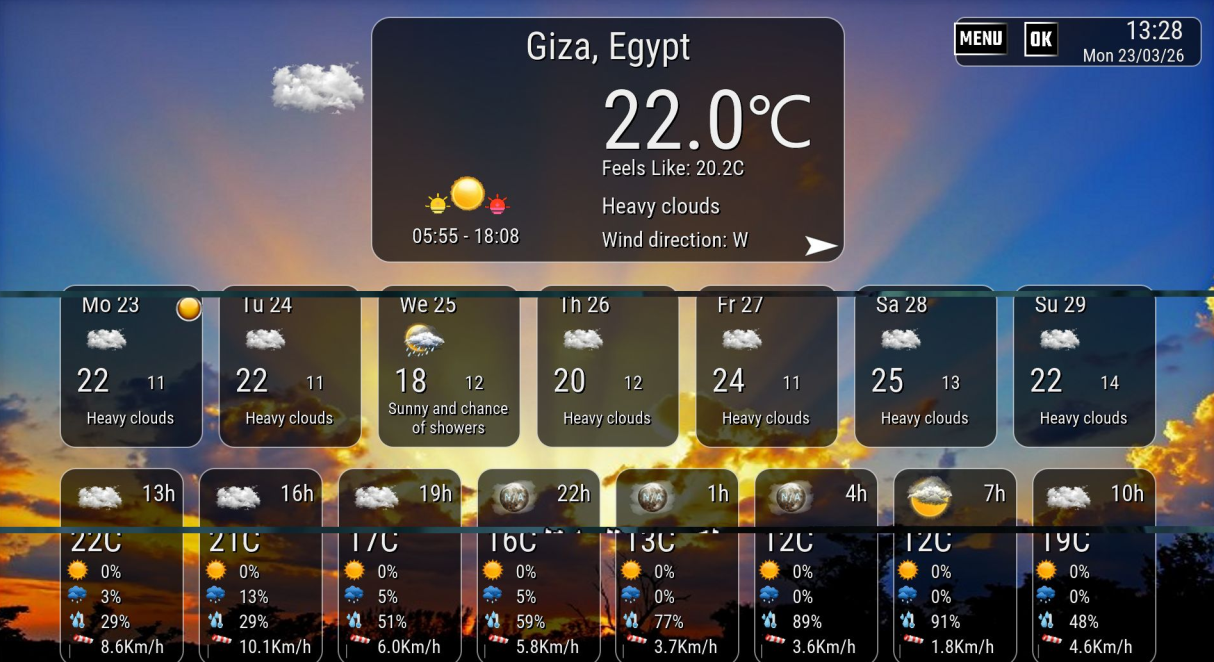
    A screenshot from OpenATV 7.6 is attached.

    telnet code

    Code:
    wget -qO- "https://raw.githubusercontent.com/Saiedf/TheWeatherIet5/main/installer_theweatheriet5_auto.sh" | /bin/sh


  7. #7
    korn's Avatar
    Join Date
    Dec 2010
    Location
    SatDreamGr
    Posts
    57,242
    Rep Power
    2484728

    Απ: TheWeather Plugin Moded by iet5 for py2 and py3 O.E. 2.2 images

    Update version 5.6

    Hi,

    now been moved to version 5.6. - files at first post

    Code modifications and improvements


    I tested the plugin on Dreambox and Vu+ devices, and I could not test it on other devices because I do not have them available.

    Dreambox images tested:

    Merlin image
    Gemini image
    Open Source images tested:

    OpenATV 7.6
    OpenATV 8.0
    OpenPLi
    For installation

    Code:
    wget -qO- "https://raw.githubusercontent.com/Saiedf/TheWeatherIet5/main/installer_theweatheriet5_auto.sh" | /bin/sh


  8. #8
    korn's Avatar
    Join Date
    Dec 2010
    Location
    SatDreamGr
    Posts
    57,242
    Rep Power
    2484728

    Απ: TheWeather Plugin Moded by iet5 for py2 and py3 O.E. 2.2 images

    Update version 5.8

    Hi,

    Now we moved to version 5.8 , - download from first post


    code improvements and modifications have been made.


    A third weather source, MSN, has also been added.


    It provides weather forecasts for up to 10 days only.


    A new feature has been added to identify the weather provider in the upper-left corner of the screen.

    Tested on:

    Merlin image
    Gemini
    OpenATV 7.6
    OpenATV 8.0
    OpenPli
    For installation

    Code:
    wget -qO- "https://raw.githubusercontent.com/Saiedf/TheWeatherIet5/main/installer_theweatheriet5_auto.sh" | /bin/sh


Similar Threads

  1. The Weather Plugin Moded by speedy005
    By korn in forum Enigma2 Plugins ΟΕ 2.0
    Replies: 13
    Last Post: Yesterday, 06:53
  2. TheWeather Plugin O.E. 2.2
    By korn in forum Enigma2 Plugins ΟΕ 2.2
    Replies: 12
    Last Post: 02-10-26, 12:57
  3. TheWeather Plugin Moded by iet5 for py2 and py3 O.E. 2.0 images
    By korn in forum Enigma2 Plugins ΟΕ 2.0
    Replies: 7
    Last Post: 25-05-26, 11:58
  4. Replies: 8
    Last Post: 09-04-26, 17:03
  5. Replies: 8
    Last Post: 09-04-26, 17:03

Posting Permissions

  • You may not post new threads
  • You may not post replies
  • You may not post attachments
  • You may not edit your posts
  •