Results 1 to 3 of 3

Thread: CiefpSettingsDownloader

  1. #1
    ciefp's Avatar
    Join Date
    Jan 2018
    Age
    53
    Posts
    359
    Rep Power
    2331947

    CiefpSettingsDownloader

    # Plugin: CiefpSettingsDownloader
    # ---------------------------------
    # Description:
    # CiefpSettingsDownloader provides Enigma2 receiver users with a fast and easy way to
    # download, install, and update satellite channel lists (settings) that are carefully
    # prepared and regularly updated by the CiefpSettings community.
    #
    # The plugin downloads and installs satellite lists directly from a GitHub repository,
    # automatically places them in the correct locations on the device, and ensures their proper
    # activation without the need for manual intervention. It also supports an automatic update
    # option to ensure the plugin is always running the latest version.
    #
    # ---------------------------------
    # Purpose:
    # The plugin is intended for Enigma2 device users who want:
    # 1. Easy access to up-to-date channel lists – Downloading the latest satellite settings
    # for various satellite configurations, such as motorized setups or multi-satellite antennas.
    # 2. Automated installation – The plugin automatically installs the lists on the correct
    # locations on the device and activates them.
    # 3. Customization – Users can choose specific lists they want to install depending on
    # their antenna and preferences.
    # 4. Stress-free updating – The automatic plugin update option ensures the user always
    # has access to the latest features and bug fixes.
    #
    # ---------------------------------
    # Key Features:
    # 1. Downloading satellite lists from the CiefpSettings community GitHub repository.
    # 2. Automatic installation of downloaded lists onto the device.
    # 3. Quick activation of lists using a service refresh function.
    # 4. Automatic checking and updating of the plugin to the latest version.
    # 5. Simple interface – Intuitive menu for navigation, selection, and downloading lists.
    # 6. Compatibility with multiple Enigma2 device types – Compatible with both Python2 and Python3 versions.
    #
    # ---------------------------------
    # Use Cases:
    # - For home users: Ideal for users who regularly update their satellite lists
    # to keep track of channel schedule changes or transponder configurations.
    # - For technicians and installers: A quick way to set up the correct channel lists
    # on multiple Enigma2 devices.
    # - For users with motorized antennas: Downloading and installing motorized settings
    # covering a wide range of satellite positions.
    #
    # ---------------------------------
    # Advantages:
    # - Saves time: The automatic installation eliminates the need for manual downloading and
    # file placement.
    # - Intuitive user experience: All operations are available through a simple interface on your TV screen.
    # - Regular updates: Always have access to the latest channel list versions.
    # - Compatibility: The plugin automatically detects the system (Python2/Python3) and installs the necessary dependencies.

    installation is done via telnet with the wget command
    Attached Images Attached Images
    Attached Files Attached Files

  2. #2
    ciefp's Avatar
    Join Date
    Jan 2018
    Age
    53
    Posts
    359
    Rep Power
    2331947

    Re: CiefpSettingsDownloader

    CiefpSettings Downloader 1.3
    Dodana podrška za py2 imidže
    Added support for py2 images
    Attached Images Attached Images

  3. #3
    korn's Avatar
    Join Date
    Dec 2010
    Location
    SatDreamGr
    Posts
    57,242
    Rep Power
    2484728

    Απ: CiefpSettingsDownloader

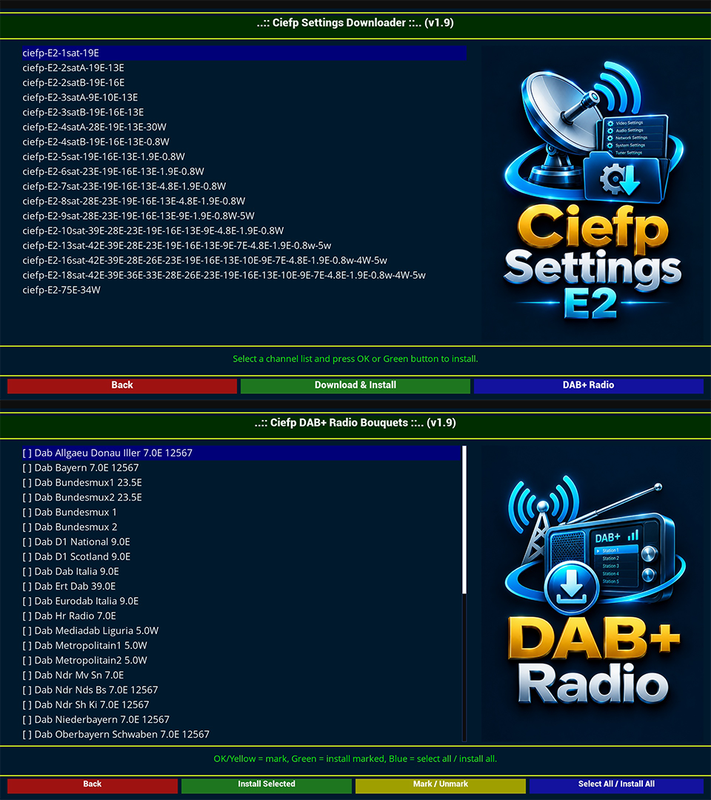
    ..:: Ciefp Settings Downloader v1.9 ::..

    NEW FEATURE: DAB+ Radio Bouquets

    This version adds a "DAB+ Radio" button that opens a new screen
    for downloading and installing DAB+ radio bouquets directly from
    GitHub (ciefp/CiefpVibesFiles → DAB_RADIO).

    The new screen offers:
    • Multi-select of bouquets (OK / Yellow = mark/unmark)
    • "Install Selected" (Green) — installs only marked bouquets
    • "Mark / Unmark" (Yellow) — quick toggle for current row
    • "Select All / Install All" (Blue) — mark all or install all
    • Pretty display names instead of raw filenames
    (e.g. "Dab Bundesmux2 23.5E" instead of "userbouquet.dab_bundesmux2_235e.radio")
    • Automatic bouquet registration in /etc/enigma2/bouquets.radio
    (#SERVICE 1:7:2:0:0:0:0:0:0:0:FROM BOUQUET "..." ORDER BY bouquet)
    • Automatic settings reload after installation

    ═══════════════════════════════════════════════════════════
    ⚠️ IMPORTANT WARNING — READ BEFORE INSTALLING DAB+ BOUQUETS
    ═══════════════════════════════════════════════════════════

    DAB+ support is currently available ONLY on:

    ➤ OpenATV DEVELOP image

    This feature is NOT yet available on official stable OpenATV
    releases, nor on other images (OpenPLi, Egami, PurE2, OpenBH, etc.).

    If you install DAB+ bouquets on an image that does NOT support DAB+:

    • the bouquets WILL be installed in /etc/enigma2/
    • they WILL appear in the radio list
    • but the bouquet content will show "N/A"
    (stations will not be playable)

    Therefore, DAB+ bouquets are currently usable only on
    OpenATV DEVELOP. Once official stable versions receive
    DAB+ support, this warning will be removed.

    If you are not sure which image version you are running:
    Menu → Information → About → Image version

    ═══════════════════════════════════════════════════════════

    Other changes in v1.9:
    • Plugin version bumped to 1.9
    • Redesigned bottom bar — 3 equal-width buttons on main
    screen (Back / Download & Install / DAB+ Radio))
    • Added new "settingsdownloader.png" logo for the Settings screen
    • Added new "dabradio.png" logo for the DAB+ screen
    • Improved stability and error handling

    .:: Ciefp Settings ::.


    Attached Files Attached Files


Posting Permissions

  • You may not post new threads
  • You may not post replies
  • You may not post attachments
  • You may not edit your posts
  •