Page 2 of 4 FirstFirst 1234 LastLast
Results 11 to 20 of 40

Thread: XDreamy-FHD skin by Mahmoud Hussein

  1. #11
    korn's Avatar
    Join Date
    Dec 2010
    Location
    SatDreamGr
    Posts
    57,243
    Rep Power
    2484728

    Απ: XDreamy-FHD skin by Mahmoud Hussein

    XDREAMY v 5.0.0


    "Experience Enigma2 skin like never before with XDREAMY"


    "XDREAMY skin is a new vision, created by Inspiron. Users can fully customize their interface, and change layout, colors, fonts, and screens to suit their preferences. Drawing inspiration from Dreamy and oDreamy skins, XDREAMY incorporates cutting-edge rendering technology, including the efficient PosterX component recoded by Lululla."


    Supported Images

    Alliance Based Images: (Egami 10.x, OpenATV 6.x, OpenATV 7.x, OpenSpa 8.x, PurE2 6.x, PurE2 7.x, OpenDroid and OpenBH).

    PLi Based Images: (OpenPLi, OpenVIX, OpenHDF, NonSoloSat, OpenTR, Cobra, Satlodge & Foxbob )


    What's New:

    XDREAMY PLUGIN: Now you have help text for each item in the Plugin list, this will answer a lot of users' inquiries and help to explain the new changes.
    XDREAMY PLUGIN: rearrange items for a better and more logical view.

    New section for SecondInfobar, you can use the old SecondInfobar screens as usual or select the custom-SecondInfoBar screen (The last one) from which you can customize your SecondInfobar style (You have a Header and Footer select the option that suits your preference and save) you will have it after reboot.
    Add 8 new cold color options to refresh your box blood and make your eye more comfortable.
    refresh the oaweather and weather plugin screens in infobar header and secondinfobar.
    Remove skin style no.6 (I am not happy with it)
    Handel a lot of users' requests.

    Telnet Code

    (Direct Install)

    Code:
    wget -q "--no-check-certificate" https://raw.githubusercontent.com/Insprion80/Skins/main/xDreamy/installer.sh -O - | /bin/sh
    Special Thanks:

    Lululla, for his close skin revision, debugging, and code tracking, as well as fixing, updating, and improving.

    giopet for his testing efforts and issues reporting.

    oktus for sharing new design ideas.


    Features:

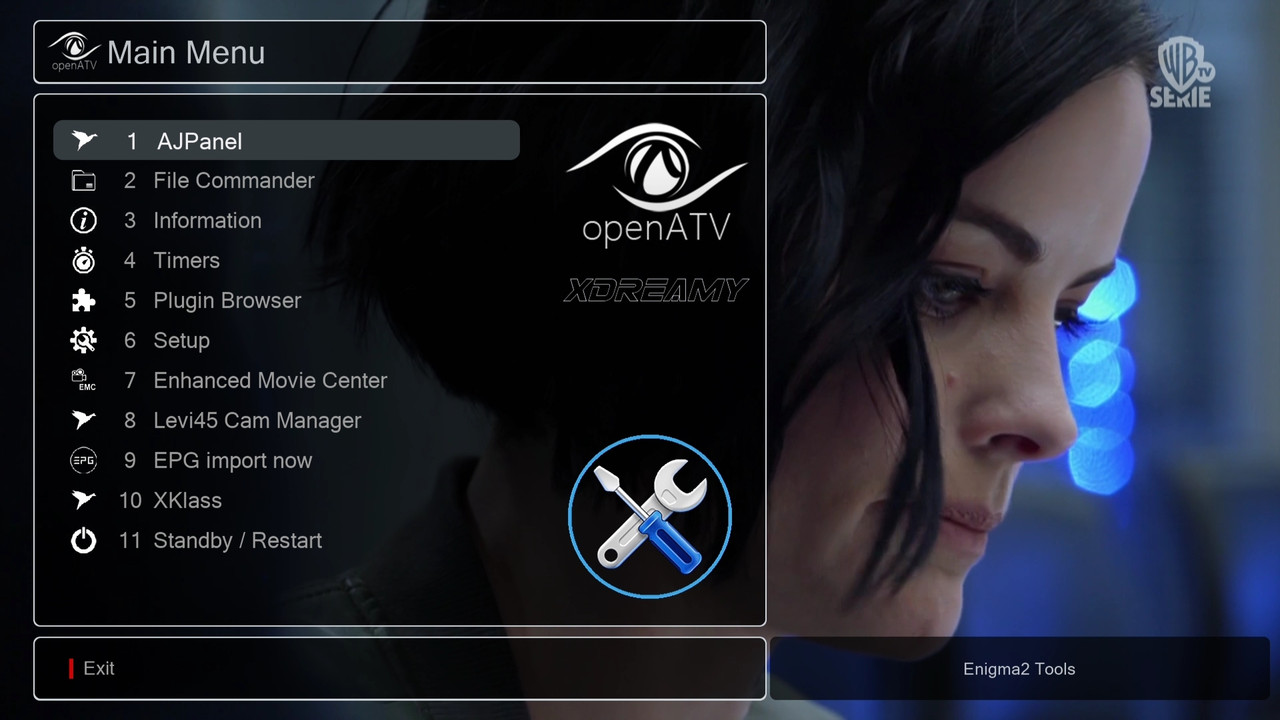
    Dedicated plugin for skin customization.
    Over 10 built-in Bootlogos.
    Over 5 additional skin styles can be applied to change your skin layout.
    Over 19 different color styles can be applied to change your skin GUI
    Over 15 different font styles can be applied to change your skin font style
    Over 5 different Keys styles can be applied to change your skin font style
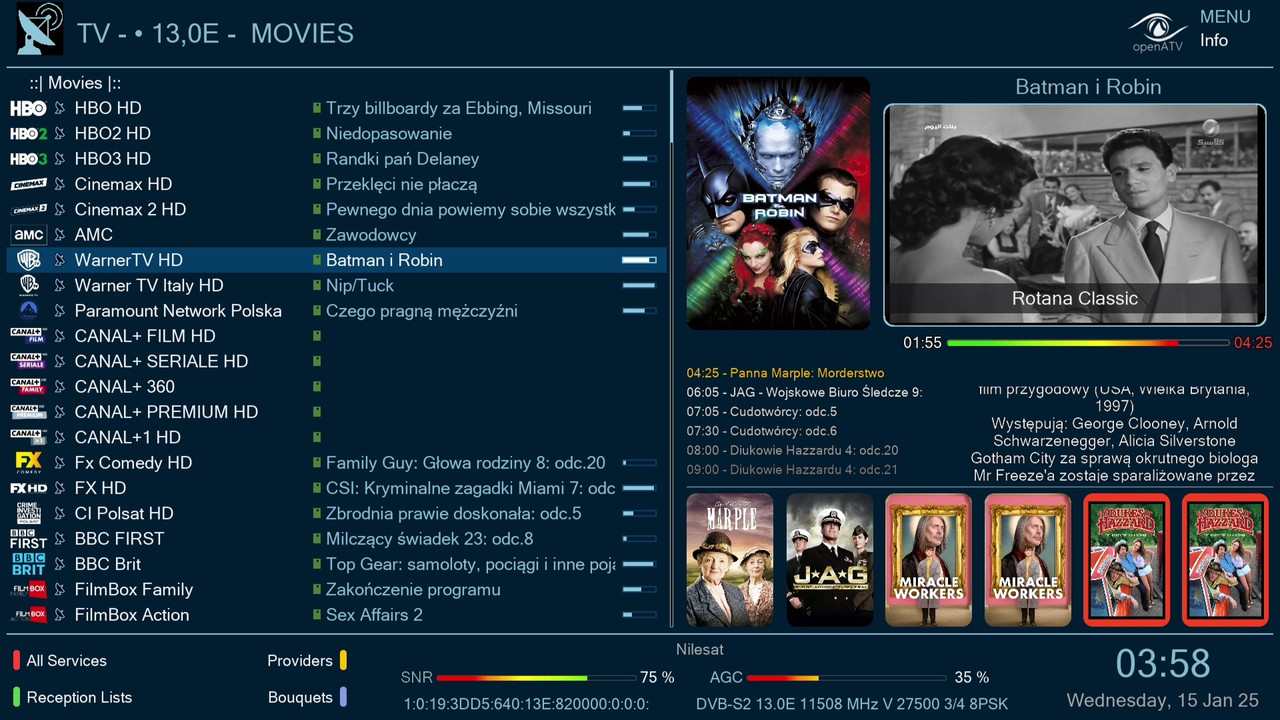
    Over 19 Channels list screens with and without posters.
    Over 8 Channels list Grid screens with and without posters.

    Direct Weather Plugin Install and set locations.
    Direct API set for TMDB & OMDB websites.
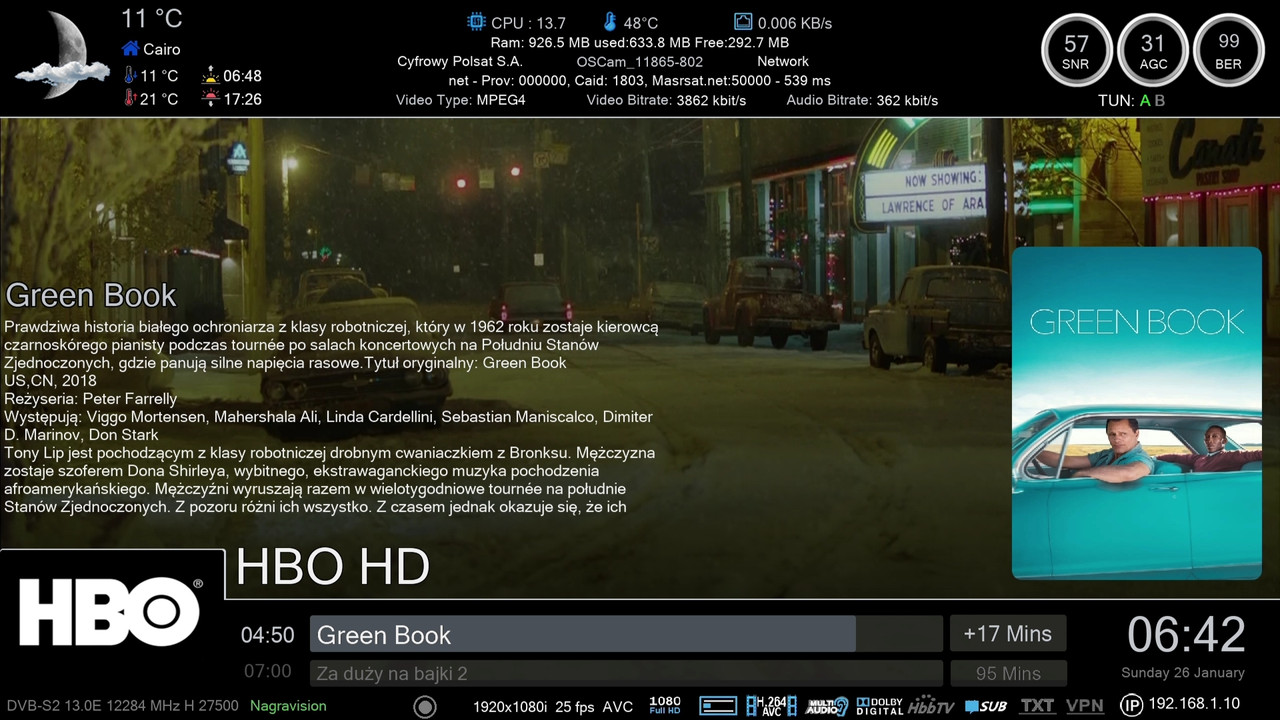
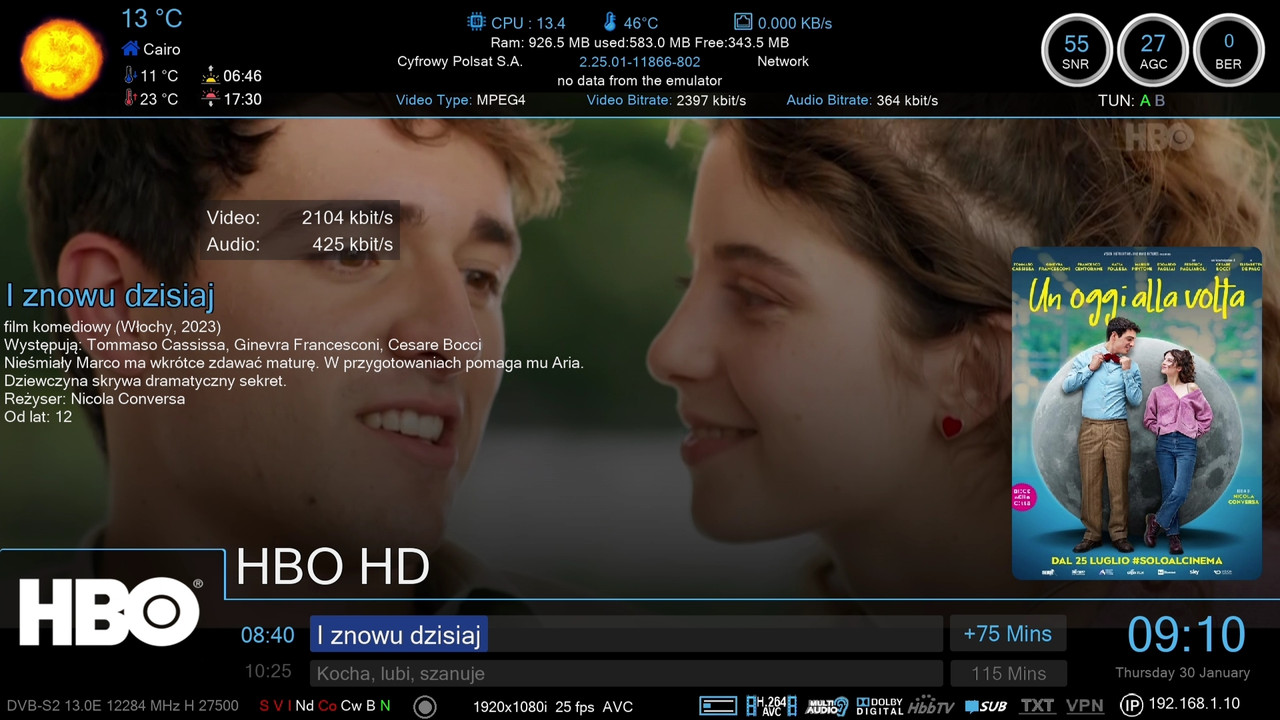
    Many InfoBar and Second InfoBar with and without posters
    Many Event View screen styles with and without posters
    Powerful and reliable PosterX renderer (Recoded by Mr.Lululla)


    Please note:

    I am not a professional skinner or developer, or anything related to sat, enigma...etc., but I like to make some customization to my box skin so that you can enjoy it on your responsibility.
    Preview images in the xDreamy plugin are not finished yet.
    Some skin features are not properly displayed with the OpenPLi image (due to the old Python version). Moreover, there is no box image available in the OpenPLI image, so if you want to display your box image on the skin, you have to manually copy your box image from the path (usr/share/enigma2) to the skin folder and rename it (boximage.png).





  2. #12
    korn's Avatar
    Join Date
    Dec 2010
    Location
    SatDreamGr
    Posts
    57,243
    Rep Power
    2484728

    Απ: XDreamy-FHD skin by Mahmoud Hussein

    XDREAMY v 5.1.0


    XDREAMY v 5.1.0

    "Experience Enigma2 skin like never before with XDREAMY"

    "XDREAMY skin is a new vision, created by Inspiron. Users can fully customize their interface, and change layout, colors, fonts, and screens to suit their preferences. Drawing inspiration from Dreamy and oDreamy skins, XDREAMY incorporates cutting-edge rendering technology, including the efficient PosterX component recoded by Lululla."

    Supported Images

    Alliance Based Images: (Egami 10.x, OpenATV 6.x, OpenATV 7.x, OpenSpa 8.x, PurE2 6.x, PurE2 7.x, OpenDroid and OpenBH).
    PLi Based Images: (OpenPLi, OpenVIX, OpenHDF, NonSoloSat, OpenTR, Cobra, Satlodge & Foxbob )

    What's New:

    New section for the Infobar, you can use the old Infobar screens as usual or select the custom-InfoBar screen (The last choice in the list) from which you can customize your Infobar style (You have a Header, Middle, and Footer choose the option that suits your preference and save) you will have it after reboot.
    Add colored Channels List Background Skin Color for the user who does not like an image as background.
    add some help text details and names for items
    Handel a lot of users' requests.
    Some Fixes and Improvements


    Telnet Code

    (Direct Install)

    Code:
    wget -q "--no-check-certificate" https://raw.githubusercontent.com/Insprion80/Skins/main/xDreamy/installer.sh -O - | /bin/sh
    Special Thanks:

    Lululla, for his close skin revision, debugging, and code tracking, as well as fixing, updating, and improving.

    giopet for his testing efforts and issues reporting.

    oktus for sharing new design ideas.


    Features:

    Dedicated plugin for skin customization.
    Over 10 built-in Bootlogos.
    Over 5 additional skin styles can be applied to change your skin layout.
    Over 19 different color styles can be applied to change your skin GUI
    Over 15 different font styles can be applied to change your skin font style
    Over 5 different Keys styles can be applied to change your skin font style
    Over 19 Channels list screens with and without posters.
    Over 8 Channels list Grid screens with and without posters.

    Direct Weather Plugin Install and set locations.
    Direct API set for TMDB & OMDB websites.
    Many InfoBar and Second InfoBar with and without posters
    Many Event View screen styles with and without posters
    Powerful and reliable PosterX renderer (Recoded by Mr.Lululla)


    Please note:

    I am not a professional skinner or developer, or anything related to sat, enigma...etc., but I like to make some customization to my box skin so that you can enjoy it on your responsibility.
    Preview images in the xDreamy plugin are not finished yet.
    Some skin features are not properly displayed with the OpenPLi image (due to the old Python version). Moreover, there is no box image available in the OpenPLI image, so if you want to display your box image on the skin, you have to manually copy your box image from the path (usr/share/enigma2) to the skin folder and rename it (boximage.png).


  3. #13
    korn's Avatar
    Join Date
    Dec 2010
    Location
    SatDreamGr
    Posts
    57,243
    Rep Power
    2484728

    Απ: XDreamy-FHD skin by Mahmoud Hussein

    XDREAMY v 5.2.0


    XDREAMY v 5.2.0

    "Experience Enigma2 skin like never before with XDREAMY"

    "XDREAMY skin is a new vision, created by Inspiron. Users can fully customize their interface, and change layout, colors, fonts, and screens to suit their preferences. Drawing inspiration from Dreamy and oDreamy skins, XDREAMY incorporates cutting-edge rendering technology, including the efficient PosterX component recoded by Lululla."

    Supported Images
    Alliance Based Images: (Egami 10.x, OpenATV 6.x, OpenATV 7.x, OpenSpa 8.x, PurE2 6.x, PurE2 7.x, OpenDroid and OpenBH).
    PLi Based Images: (OpenPLi, OpenVIX, OpenHDF, NonSoloSat, OpenTR, Cobra, Satlodge & Foxbob )

    What's New:

    XDREAMY TOOLBOX:
    Introduced a new "XDREAMY TOOLBOX" feature.
    Provides easy access to essential Enigma2 plugins without the need for manual DDC or telnet commands.
    Simplifies plugin installation with a single-click, directly from developer telnet links.
    Streamlines the setup process after a fresh image installation.
    Plugin Code Optimization:
    Enhanced plugin code with the assistance of ChatGPT.
    Improved code structure and efficiency.
    Updated INFOBAR and SECONDINFORBAR sections for a cleaner and more user-friendly experience.
    Custom options now remain hidden until the user explicitly selects "Custom-InfoBar" or "Custom-SecondInfoBar."
    Background Screen Restoration:
    Reintroduced the channel list background screen option for users who requested it.
    iVpn Converter Update:
    Updates were incorporated into the iVpn Converter courtesy of Madhouse.
    iRunning Text Renderer Improvement:
    Enhanced the iRunning text renderer, now automatically displaying Arabic text from right to left.
    Screen Enhancements:
    Added dedicated screens for specific plugins.
    Implemented image previews for enhanced user experience.

    Telnet Code

    (Direct Install)

    Code:
    wget -q "--no-check-certificate" https://raw.githubusercontent.com/Insprion80/Skins/main/xDreamy/installer.sh -O - | /bin/sh
    Special Thanks:

    Lululla, for his close skin revision, debugging, and code tracking, as well as fixing, updating, and improving.

    giopet for his testing efforts and issues reporting.

    oktus for sharing new design ideas.


    Features:

    Dedicated plugin for skin customization.
    Over 10 built-in Bootlogos.
    Over 5 additional skin styles can be applied to change your skin layout.
    Over 19 different color styles can be applied to change your skin GUI
    Over 15 different font styles can be applied to change your skin font style
    Over 5 different Keys styles can be applied to change your skin font style
    Over 19 Channels list screens with and without posters.
    Over 8 Channels list Grid screens with and without posters.

    Direct Weather Plugin Install and set locations.
    Direct API set for TMDB & OMDB websites.
    Many InfoBar and Second InfoBar with and without posters
    Many Event View screen styles with and without posters
    Powerful and reliable PosterX renderer (Recoded by Mr.Lululla)


    Please note:

    I am not a professional skinner or developer, or anything related to sat, enigma...etc., but I like to make some customization to my box skin so that you can enjoy it on your responsibility.
    Preview images in the xDreamy plugin are not finished yet.
    Some skin features are not properly displayed with the OpenPLi image (due to the old Python version). Moreover, there is no box image available in the OpenPLI image, so if you want to display your box image on the skin, you have to manually copy your box image from the path (usr/share/enigma2) to the skin folder and rename it (boximage.png).


  4. #14
    korn's Avatar
    Join Date
    Dec 2010
    Location
    SatDreamGr
    Posts
    57,243
    Rep Power
    2484728

    Απ: XDreamy-FHD skin by Mahmoud Hussein

    XDREAMY v 5.2.1


    XDREAMY v 5.2.1

    "Experience Enigma2 skin like never before with XDREAMY"


    What's New:

    FIX KeyText error with PLi and HDF.
    FIX png error with PLi >Thanks Lululla
    FIX the default skin color.

    Expand No of Tuners (I was not expecting more than 10)
    Remove the Softcam Name shown in the header of some custom infobar screens.
    Finally, Add the FORECA Weather plugin screen (I hope you like it with my touch).
    General Fixes and Improvements (Revise skin components)

    Telnet Code

    (Direct Install)

    Code:
    wget -q "--no-check-certificate" https://raw.githubusercontent.com/Insprion80/Skins/main/xDreamy/installer.sh -O - | /bin/sh
    Please Note

    The XDREAMY TOOLS BOX at the end of XDREAMY skin parameters will move down more, and you will have it.


  5. #15
    korn's Avatar
    Join Date
    Dec 2010
    Location
    SatDreamGr
    Posts
    57,243
    Rep Power
    2484728

    Απ: XDreamy-FHD skin by Mahmoud Hussein

    XDREAMY v 5.3.0


    XDREAMY v 5.3.0

    "Experience Enigma2 skin like never before with XDREAMY"

    What's New:

    Update the Installation Script to check, download, and install the required dependencies during the installation. (Experimental)
    Update the installation script to use the distro-logo located in unknown images to use it as an image logo. (Experimental)
    Update the iConverlibr.py and posters rendering using ChatGPT.
    Add a Transparent color scheme to replace Skin Style 6, which was previously removed.
    Add a screen for the new Device Manager.
    Add a Black color Scheme (New).
    Add one style channels list full (Grid09).
    Clean, Optimize, and uniform skin code for better response.
    Add more items to XDREAMY TOOLS BOX (SmartAddnsPanel, ElisatPanel, MagicPanel, IPAudiopro, OAweather...etc)
    Fixes and Improvements.

    Telnet Code

    (Direct Install)

    Code:
    wget -q "--no-check-certificate" https://raw.githubusercontent.com/Insprion80/Skins/main/xDreamy/installer.sh -O - | /bin/sh
    Please Note

    The XDREAMY TOOLS BOX at the end of XDREAMY skin parameters will move down more, and you will have it.


  6. #16
    korn's Avatar
    Join Date
    Dec 2010
    Location
    SatDreamGr
    Posts
    57,243
    Rep Power
    2484728

    Απ: XDreamy-FHD skin by Mahmoud Hussein

    [QUOTE=korn;180593]
    XDREAMY v 5.4.0


    XDREAMY v 5.4.0

    "Experience Enigma2 skin like never before with XDREAMY"

    What's New:

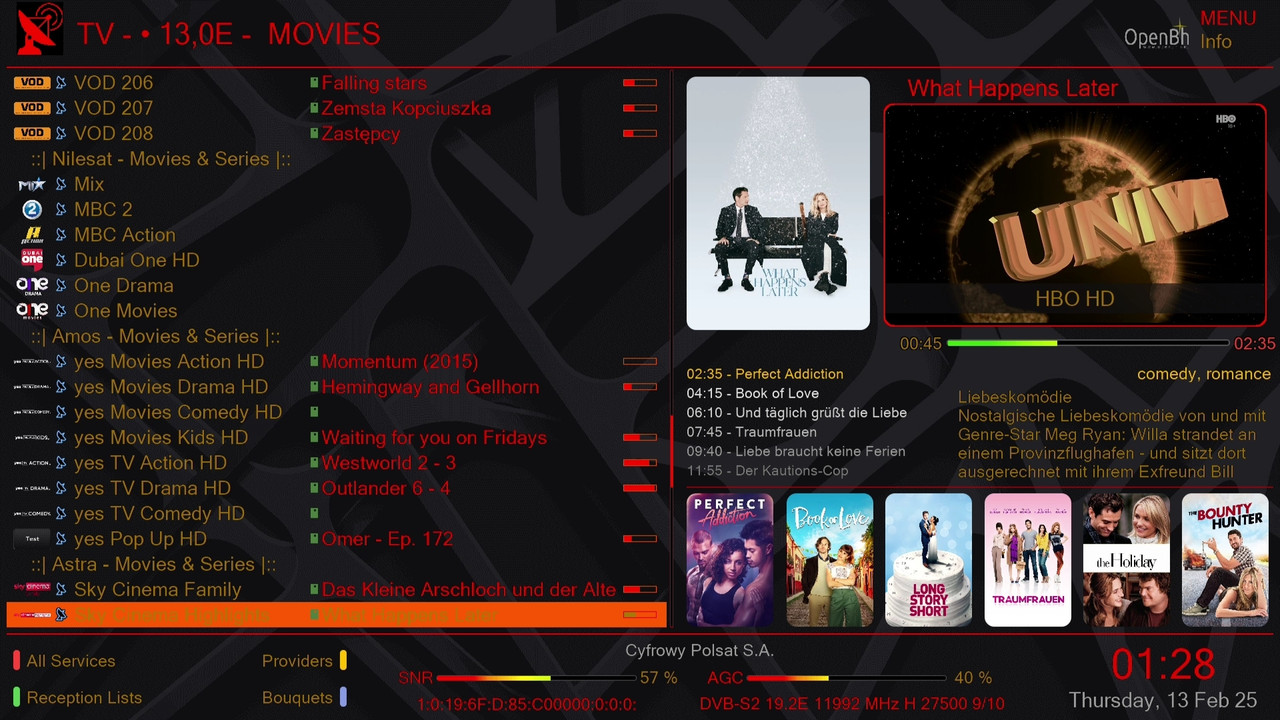
    A new level of poster download and display continues the improvements in rendering and methodology, which are now more accurate, faster, and perfect.
    Add a new option in the infobar to swap between crypto-name and crypto-bar to change the look of channel encryption.
    Improvement in skin response speed as after speed poster improvements.
    XDREAMY PLUGIN: Code optimization.
    Fixes and Improvements.

    Telnet Code

    (Direct Install)

    Code:
    wget -q "--no-check-certificate" https://raw.githubusercontent.com/Insprion80/Skins/main/xDreamy/installer.sh -O - | /bin/sh


  7. #17
    korn's Avatar
    Join Date
    Dec 2010
    Location
    SatDreamGr
    Posts
    57,243
    Rep Power
    2484728

    Απ: XDreamy-FHD skin by Mahmoud Hussein

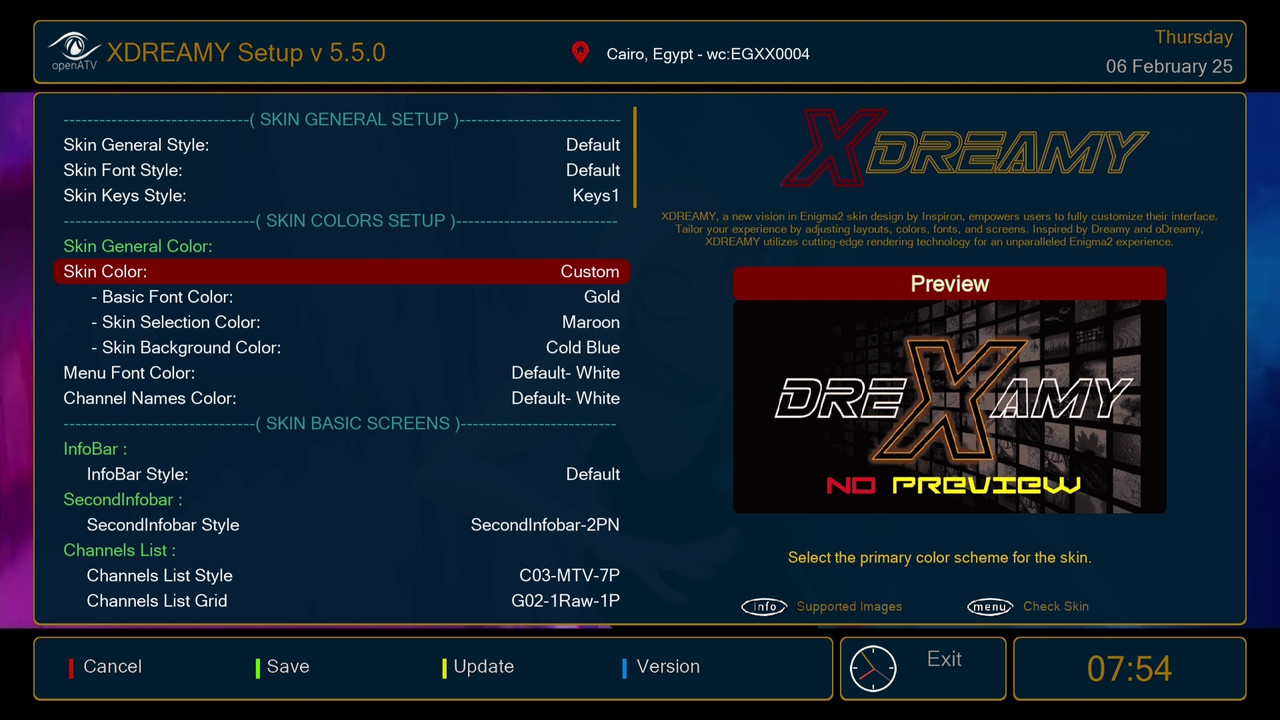
    XDREAMY v 5.5.0


    XDREAMY v 5.5.0

    "Experience Enigma2 skin like never before with XDREAMY"


    What's New:

    Installation Script Enhancements:
    We’ve revamped the installation script to make it smarter, more user-friendly, and easier to debug. Here’s what’s new:

    Image Detection and Branding:
    The script now identifies the current Enigma2 image being used.
    If the image has a dedicated logo, it will be displayed during installation. If not, the script will use a default logo or a generic distro logo for a consistent visual experience.
    Image-Specific Dependency Installation:
    The script detects the type of Enigma2 image (e.g., OpenATV, OpenPLi, VTi, etc.) and automatically installs the required dependencies tailored to the image. This ensures smoother compatibility and fewer errors.
    Installation Debugging Log:
    A detailed installation log is now created at /tmp/xDreamy_install.log. This log provides real-time insights into the installation process, making it easier to diagnose and resolve any issues.
    User-Friendly Feedback:
    The installation process now provides more detailed feedback to users, explaining each step in plain language. This helps users understand what’s happening during installation and reduces confusion.
    XDREAMY Plugin Updates:
    We’ve added exciting new customization options to the XDREAMY plugin to make it more personal and visually appealing:

    Customizable Skin Colors:
    You can now personalize the skin’s appearance by adjusting three key color variables:
    Basic Font Color: Choose the primary text color for better readability.
    Selection Color: Customize the highlight color for selected items.
    Background Color: Set the background color to match your preferences.
    These options allow you to create a skin that suits your style and enhances your viewing comfort.
    Additional API Key Support:
    We’ve added the ability to activate or add up to two more API keys for:
    Fanart.tv: Enhance your media library with high-quality artwork.
    TheTVDB: Access comprehensive metadata for TV shows.
    This gives you more flexibility and control over your media experience.
    Change Plugin Logo:
    XDREAMY Tools Box Improvements:
    The Tools Box has been upgraded with new features to make plugin management simpler and more efficient:

    Enhanced Plugin Management:
    A unified interface now allows you to Open, Install, Reinstall, or Remove plugins with a single press of the OK button. No more navigating through multiple menus!
    Plugin Status Indicator:
    The Tools Box now displays the installation status of each plugin (e.g., Installed or Not Installed). This makes it easier to keep track of your plugins and avoid duplicates.
    API Key Status Display:
    You can now check the status of your personal API keys directly in the Tools Box. It shows whether you’re using a Personal API Key or the default Skin API Key, giving you better control over your integrations.
    Telnet Code

    (Direct Install)

    Code:
    wget -q "--no-check-certificate" https://raw.githubusercontent.com/Insprion80/Skins/main/xDreamy/installer.sh -O - | /bin/sh


  8. #18
    korn's Avatar
    Join Date
    Dec 2010
    Location
    SatDreamGr
    Posts
    57,243
    Rep Power
    2484728

    Απ: XDreamy-FHD skin by Mahmoud Hussein

    XDREAMY v 5.6.0


    XDREAMY v 5.6.0

    "Experience Enigma2 skin like never before with XDREAMY"

    What’s New in XDREAMY v5.6.0

    Installation Script Enhancements

    I’ve made significant improvements to the installation and removal scripts to ensure a smoother and more user-friendly experience. The updated scripts are now more accurate and informative, providing clear feedback during the installation process. This makes it easier for users to track and understand what’s happening on their device.

    Restore back the option to detect the box model and add boximage to skin folder automatically

    XDREAMY Plugin Updates

    The XDREAMY plugin has been upgraded with exciting new customization options, allowing you to personalize your skin like never before. Here’s what’s new:

    1- Customizable Skin Colors

    You can now personalize the skin’s appearance by adjusting four key color variables:

    Titles Font Color: Choose the color for title text to improve readability.
    Text Font Color: Select the primary text color for better clarity.
    Selection Color: Customize the highlight color for selected items.
    Background Color: Set the background color to match your preferences.

    To use this feature, simply select the "Custom" option in the Skin Color settings. A list of color variables will appear, allowing you to make changes in any order and as often as you like. Create a skin that truly reflects your style and enhances your viewing experience!

    2- Font Style and Size Customization

    Personalize your skin further by adjusting the font style and size directly from the XDREAMY plugin—no need to upload additional files.

    Font Style: Choose your preferred font style directly from the plugin. The new option automatically writes the selected font name to the font file.
    Font Size: Adjust the font size with ease. Increase or decrease the size in 5% increments, with a range of up to 35% larger or smaller, depending on your preferences and the font type you choose.

    3- Show in the Extension Menu

    We’ve added an option to include the XDREAMY Plugin in the extension menu for quick and easy access. This makes it more convenient to customize your skin on the go.

    XDREAMY Tools Box Improvements:

    The Tools Box has been upgraded with new features to enhance usability:

    Plugin Picture Preview: The updated Tools Box now includes a plugin picture preview feature, making plugins more visible and easier to identify.

    This version is more polished, professional, and easier to read while maintaining the original intent of your post. Let me know if you’d like further adjustments!

    Telnet Code

    (Direct Install)

    Code:
    wget -q "--no-check-certificate" https://raw.githubusercontent.com/Insprion80/Skins/main/xDreamy/installer.sh -O - | /bin/sh


  9. #19
    korn's Avatar
    Join Date
    Dec 2010
    Location
    SatDreamGr
    Posts
    57,243
    Rep Power
    2484728

    Απ: XDreamy-FHD skin by Mahmoud Hussein

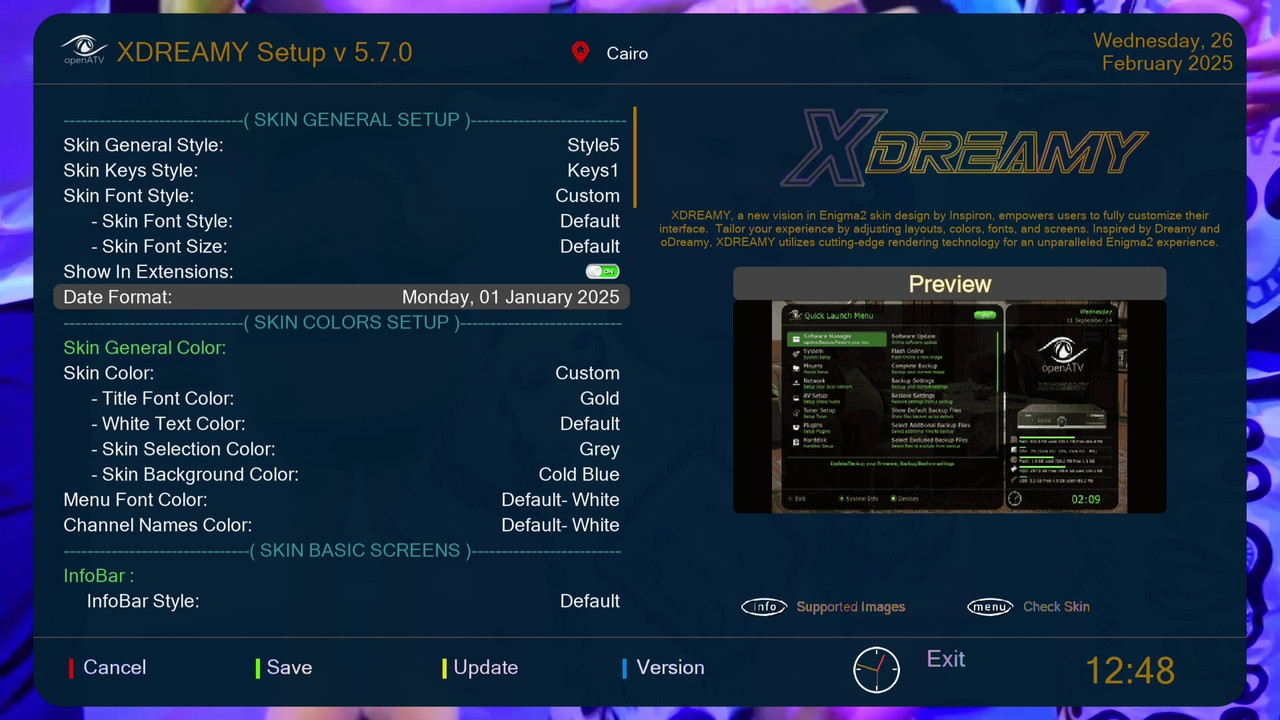
    XDREAMY v 5.7.0


    XDREAMY v 5.7.0

    "Experience Enigma2 skin like never before with XDREAMY"

    What’s New in XDREAMY v5.7.0

    XDREAMY Plugin Updates

    The XDREAMY plugin has been upgraded with exciting new customization options, allowing you to personalize your skin like never before. Here’s what’s new:

    1- Customization for Date Format:

    You can now personalize the skin’s appearance by adjusting your Date Formats:

    ("01 January 2025"),
    ("01 January 25"),
    ("01 Jan 2025"),
    ("01 Jan 25"),
    ("01-01-2025"),
    ("01-01-25"),
    ("2025-01-01"),
    ("25-01-01"),
    ("01/01/2025"),
    ("01/01/25"),
    ("01/01/2025"),
    ("01/01/25"),
    ("2025.01.01"),
    ("25.01.01"),
    ("Monday, 01 January 2025"),
    ("Mon, 01 Jan 2025"),
    ("Monday 01 January 2025"),
    ("Mon 01 Jan 2025"),
    ("01 January, 2025"),
    ("01 Jan, 2025"),
    ("January 01, 2025"),
    ("Jan 01, 2025"),
    ("2025 January 01"),
    ("2025 Jan 01"),
    ("25 January 01"),
    ("25 Jan 01"),
    ("01.01.2025"),
    ("01.01.25"),
    ("01 01 2025"),
    ("01 01 25")]
    To use this feature, select the date format from the Date Format option in the Skin plugin settings. A list of date variables will appear. Create a skin that truly reflects your style and enhances your viewing experience!

    2- Posters Improvement

    More improvement in poster rendering, through updating the regex and improving it, now you have better, more effective, and more accurate posters than ever before,

    XDREAMY General Improvements:

    1. More improvement in skin file structure, merge more files to reduce the files count.

    2. More reduction in skin overall size (the ipk size now is 16.2 MB) which mean better performance on low-memory devices with more features.

    3. Handel some user's requests and minor fixes.

    Telnet Code

    (Direct Install)

    Code:
    wget -q "--no-check-certificate" https://raw.githubusercontent.com/Insprion80/Skins/main/xDreamy/installer.sh -O - | /bin/sh


  10. #20
    korn's Avatar
    Join Date
    Dec 2010
    Location
    SatDreamGr
    Posts
    57,243
    Rep Power
    2484728

    Απ: XDreamy-FHD skin by Mahmoud Hussein

    XDREAMY v 5.8.0


    XDREAMY v 5.8.0

    "Experience Enigma2 skin like never before with XDREAMY"

    What’s New in XDREAMY v5.8.0

    Last Version (Ramadan Break)

    1. Skin Files Structure Improvements

    The merging and optimization of skin files are already a huge step forward. To make it even more efficient and user-friendly,

    2. Posters Rendering System
    The new rendering technique sounds amazing! Let’s make it even more efficient and delightful.

    Telnet Code

    (Direct Install)

    Code:
    wget -q "--no-check-certificate" https://raw.githubusercontent.com/Insprion80/Skins/main/xDreamy/installer.sh -O - | /bin/sh


Page 2 of 4 FirstFirst 1234 LastLast

Similar Threads

  1. VU+ Skin Elgato-HD-CN Skin mod by Cino
    By korn in forum Enigma2 Skins ΟΕ 2.0
    Replies: 0
    Last Post: 07-03-16, 12:07
  2. VU+ Skin UltraLight skin m-mod
    By korn in forum Enigma2 Skins ΟΕ 2.0
    Replies: 0
    Last Post: 04-03-16, 16:11
  3. LLS - FullHD Skin v1.20 / DreamPlex Skin v1.46
    By KOSTA in forum Enigma2 Skins ΟΕ 2.0
    Replies: 0
    Last Post: 10-03-15, 17:33
  4. Skin-Merdas-HD-Skin-VIP
    By korn in forum Enigma2 Skins ΟΕ 2.0
    Replies: 0
    Last Post: 30-09-12, 08:21
  5. Skin- Borsalino-Skin-HD-Merdas-V14
    By korn in forum Enigma2 Skins ΟΕ 2.0
    Replies: 0
    Last Post: 27-09-12, 07:49

Posting Permissions

  • You may not post new threads
  • You may not post replies
  • You may not post attachments
  • You may not edit your posts
  •